


Why Google Cast Sounds Different Across Apps: Cloud Pull vs System Mirroring Explained
For Android audiophiles, Google Cast (Chromecast built-in) is the most powerful bridge to high-fidelity wireless audio. However, many users are confused by the inconsistent behavior between different streaming apps. At OpenAudio, we believe in technical transparency. The reality is that Google Cast operates via two distinct engines: Cloud Pull and System Mirroring.
Understanding these modes is essential to unlocking the full potential of your HOLO-WHAS Plus-GC or Ultra-GC system.
1. Mode A: Cloud Pull (The Audiophile’s “Direct Drive”)
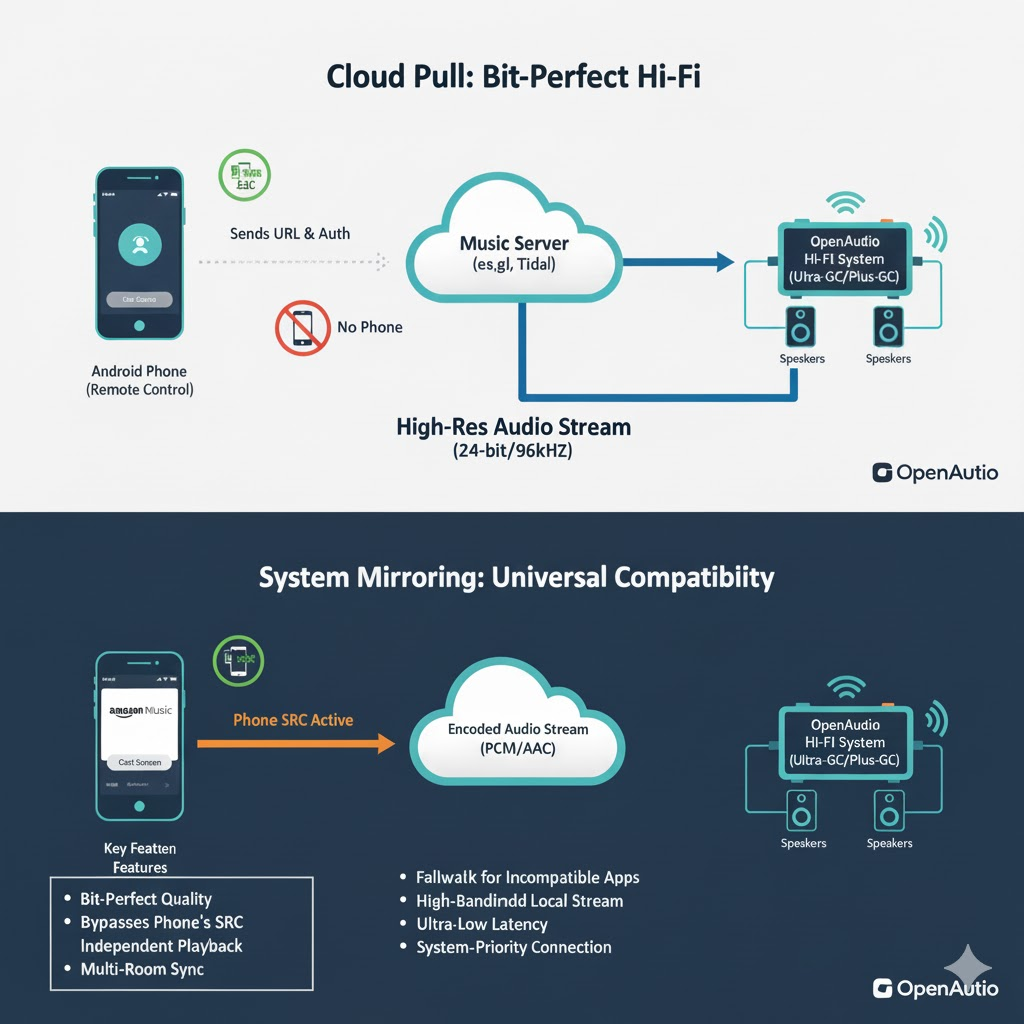
Cloud Pull is the most advanced transmission method, natively supported by apps like Spotify, Tidal, and YouTube Music.
How it Works
When you tap the Cast icon, your phone acts only as a “Session Controller.” It sends a secure instruction to your Plus-GC or Ultra-GC. The amplifier then uses its own dedicated network processor to establish a direct, high-bandwidth connection to the music provider’s server.
The Technical Superiority
- Bit-Perfect Integrity: Because the audio data never enters your phone, it completely bypasses the Android Sample Rate Converter (SRC), which traditionally forces all audio through a lossy 48kHz resampler.
- High-Resolution Support: It allows our hardware to pull original files up to 24-bit/96kHz directly to the premium DAC stages.
- Total Independence: Your phone is freed up for calls or videos, and the music will continue even if your phone is powered off—a hallmark of the Plus-GC and Ultra-GC experience.
2. The Reality of Amazon Music & Qobuz: Why Cloud Pull Often Fails
One of the most frequent questions we receive at openaudio.io is: “Why can’t I see the Cast button in Amazon Music?” or “Why is my Qobuz stream limited in quality?”
The truth is that not all apps support the Cloud Pull engine equally:
- Amazon Music’s “Walled Garden”: Due to DRM (Digital Rights Management) restrictions and ecosystem competition, Amazon Music frequently disables the “Cloud Pull” Cast button for third-party Hi-Fi hardware. Even when available, it often restricts the quality to 16-bit CD grade to prioritize their own Echo devices.
- Qobuz’s Bandwidth Demands: While Qobuz technically supports Cloud Pull, their ultra-high-bitrate files (up to 192kHz) require an extremely stable handshake. If the app detects any network fluctuation, it may fail to initiate the direct pull, leaving the user without a connection.
3. Mode B: System Mirroring (The Universal “Safety Net”)
When an app like Amazon Music or Qobuz refuses to “pull” from the cloud, our Plus-GC and Ultra-GC hardware utilizes its second engine: System Mirroring.
How it Works
You initiate this via the “Cast Screen/Audio” option in your Android system settings. Your phone decodes the music locally and transmits the raw audio stream directly to the amplifier.
Why OpenAudio Hardware Makes Mirroring Better
While mirroring is often seen as a secondary option, the Plus-GC and Ultra-GC optimize this path in ways standard receivers cannot:
- Kernel-Level Priority: Our certified Google Cast implementation ensures your phone treats the OpenAudio system as a system-priority output, minimizing the dropouts common in non-certified hardware.
- Ultra-Low Latency: We maintain a synchronization window of <200ms, ensuring that even if you are watching a concert video on your phone, the audio remains perfectly synced with your high-end speakers.
- Advanced Multi-Room Sync: Even in mirroring mode, the Plus-GC uses its hardware-level timing to ensure that audio remains synchronized across multiple zones—a critical feature for whole-home audio integrators.
4. Technical Comparison: Cloud Pull vs. System Mirroring
| Metric | Cloud Pull (App-Direct) | System Mirroring (System-Cast) |
| Typical Apps | Spotify, Tidal, YouTube Music | Amazon Music, Qobuz, Web Audio |
| Audio Latency | Medium/High (1–3s Command Latency) | Ultra-Low (<200ms Sync Latency) |
| Lip-Sync (A/V) | N/A (Independent Streaming) | Excellent (Perfect for Video/Live streams) |
| Data Path | Cloud Server->Plus/Ultra-GC | Phone-> Plus/Ultra-GC |
| Audio Integrity | Bit-Perfect (up to 24-bit/96kHz) | 16-bit/48kHz (Subject to Android SRC) |
| Multi-Room Sync | Precision (Hardware PTP Sync) | High (Software-based Sync) |
| Phone Battery | Negligible (Phone can be powered Off) | High (Constant Encoding & WiFi Tx) |
Conclusion: Pure Sound, No Matter the App
Whether you are enjoying a bit-perfect Tidal Master via Cloud Pull or navigating the complexities of Amazon Music via System Mirroring, the OpenAudio Plus-GC and Ultra-GC are engineered to handle the heavy lifting.
By integrating this dual-mode Google Cast architecture, we ensure that your music reaches your ears with the highest possible stability and fidelity, regardless of the app’s internal limitations.
Deep Dive: The Latency Paradox
To a professional or an audiophile, the word “Latency” can be counter-intuitive. In the context of the OpenAudio Plus-GC and Ultra-GC, here is why the latency differs:
Why Cloud Pull has higher command latency:
In Cloud Pull mode, the Plus-GC/Ultra-GC prioritizes Stability and Fidelity over instantaneous response.
- Deep Buffering: The amplifier pre-fetches several seconds of audio data from the cloud server into its internal high-speed buffer.
- The Benefit: This “safety net” protects your Hi-Res 96kHz stream from local Wi-Fi fluctuations or network jitter. While it takes an extra second for the “Next Track” command to execute, the playback remains flawlessly smooth and bit-perfect.
Why System Mirroring is “Instant”:
System Mirroring is designed for Real-Time Interaction.
- Kernel Optimization: The Android system treats mirrored audio as a “Real-Time Task.” To ensure that sound matches the action on your phone screen (e.g., watching a concert on YouTube or a live event on Amazon Live), the system reduces the buffer to a minimum.
- OpenAudio Hardware Advantage: The Plus-GC and Ultra-GC utilize a specialized low-latency hardware path to process these real-time packets. This ensures that the audio reaches your speakers in under 200ms, maintaining perfect Lip-Sync that cheaper, non-certified receivers simply cannot achieve.
Summary for OpenAudio Clients
a simple rule of thumb
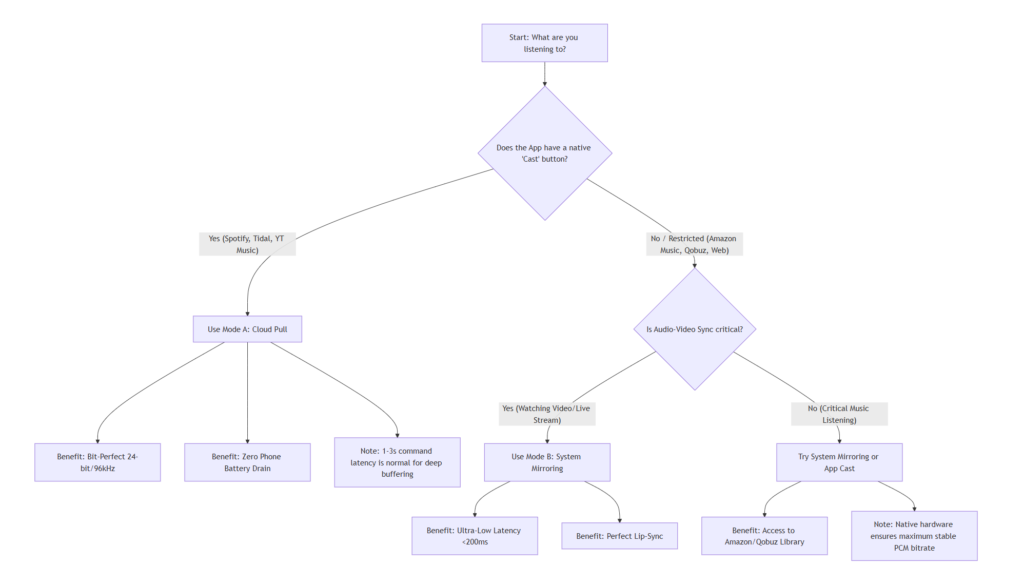
- For Critical Listening: Use Cloud Pull (via Spotify/Tidal) to achieve the highest possible bit-depth and network stability.
- For Video & Incompatible Apps: Use System Mirroring (via Android Settings) to ensure real-time synchronization with your phone’s display.



Blaze
27 Jan, 2026Great technical deep dive. Most people don't realize mirroring kills their phone battery and audio quality. Cloud pull is the only way to go for serious listening.