


Is DLNA Still Relevant?
A Deep, System-Level Analysis in the Era of AirPlay, Google Cast, Spotify Connect, and Music Assistant
DLNA (Digital Living Network Alliance) was once the backbone of home media sharing. For over a decade, it enabled phones, PCs, NAS servers, AVRs, and amplifiers from different vendors to discover each other and exchange audio with minimal configuration.
Today, however, DLNA often triggers strong and polarized reactions:
- Some consider it obsolete and useless
- Others still rely on it daily for stable multi-room playback
So the real question is not simply “Is DLNA dead?” but rather:
What role—if any—does DLNA still play in modern audio system architectures?
This article provides a deep, architecture-level answer, separating outdated assumptions from real-world technical reality.
1. What DLNA Was Actually Designed For
DLNA was designed in an era before smartphones dominated media playback. Its core assumptions were fundamentally different from today’s mobile-first mindset.
1.1 The DLNA Architecture Model
DLNA defines a media-routing framework, not a user interaction model. It separates responsibilities into three roles:
- DMS (Digital Media Server)
Hosts media content or streams (files, radio, network sources) - DMC (Digital Media Controller)
Selects content and instructs where it should be played - DMR (Digital Media Renderer)
Decodes and outputs audio
This separation is critical: the controller is not the audio source.
1.2 What DLNA Explicitly Does Not Do
DLNA was never designed to:
- Mirror system audio
- Capture arbitrary application sound
- Act as a low-latency screen/audio casting protocol
In other words:
DLNA routes media, not sound devices.
This single design choice explains most modern misunderstandings.
2. Why DLNA Cannot Output “All Audio” From a Phone
A common expectation today is:
“If my phone makes a sound, I should be able to cast it.”
DLNA fundamentally cannot satisfy this expectation.
2.1 DLNA Is Media-Scoped, Not System-Scoped
When a phone uses DLNA:
- The DLNA-capable app explicitly hands a media URL or stream to a renderer
- The renderer pulls or receives the stream directly
What DLNA never sees:
- System mixer output
- App audio buffers
- OS-level sound events
2.2 Practical Consequences
DLNA cannot forward:
- YouTube audio
- Social media videos
- Games
- Browser tabs
- Notification sounds
Regardless of platform, DLNA is incapable of acting as a global audio sink.
3. Mobile Platform Reality: Android vs iOS (In Depth)
3.1 Android: Partial, App-Centric Support
Android historically allowed greater flexibility, which is why DLNA survived longer in this ecosystem.
However:
- DLNA is not part of Android’s system audio stack
- Each app must implement DLNA explicitly
As a result:
- Apps like BubbleUPnP or Hi-Fi Cast work well
- Most commercial music apps do not integrate DLNA at all
Even on Android, DLNA remains opt-in and app-limited.
3.2 iOS: DLNA as a Second-Class Citizen
Apple’s ecosystem is intentionally closed:
- No native DLNA APIs
- Strict background execution limits
- AirPlay is the only first-class audio routing technology
DLNA on iOS exists only through third-party apps and is unsuitable for automation or multi-zone systems.
4. Why Mainstream Music Apps Avoid DLNA
From a technical and business perspective, DLNA offers no strategic advantage to major streaming services.
4.1 Commercial Incentives
Music services want:
- Full control over UX
- DRM enforcement
- Analytics and session tracking
- Predictable support matrices
DLNA provides none of these guarantees.
4.2 Resulting Reality
| Service | DLNA | Preferred Protocol |
| Apple Music | ❌ | AirPlay |
| Spotify | ❌ | Spotify Connect / Cast |
| YouTube Music | ❌ | Google Cast |
| Amazon Music | ❌ | Google Cast |
| TIDAL / Qobuz | ❌ | Cast / Roon |
DLNA simply does not align with modern streaming economics.
5. Why DLNA Still Exists (And Why It Works Well There)
Despite its decline in consumer-facing scenarios, DLNA remains exceptionally effective in specific contexts.
5.1 System-Driven Audio Architectures
In systems like:
- Home Assistant
- Music Assistant
- OpenHAB
- Custom automation platforms
Playback is orchestrated centrally, not initiated from a phone.
In this model:
- DLNA renderers behave as stable, addressable endpoints
- Playback persists regardless of UI state
- Automation becomes deterministic
Here, DLNA’s original design shines.
5.2 Multi-Zone Audio Backplanes
DLNA excels at:
- Zone discovery
- Persistent endpoints
- Server-driven routing
It behaves less like “casting” and more like an audio transport layer.
5.3 Local and Enterprise Media
DLNA remains common in:
- NAS-based libraries
- Commercial AV installations
- Legacy receivers and displays
These environments value stability over novelty.
6. Music Assistant: DLNA’s Modern Stronghold
Music Assistant deserves to be discussed as a standalone scenario, because it represents a fundamentally different usage model from traditional consumer casting—and it is the clearest example of why DLNA still matters today.
This is not an edge case. It is arguably the most correct modern application of DLNA.
6.1 A Shift From User-Driven to System-Driven Playback
In traditional casting models (AirPlay, Google Cast, Bluetooth), playback is initiated and owned by a user device:
- The phone selects the content
- The phone establishes the session
- The phone often remains part of the playback lifecycle
Music Assistant reverses this model entirely.
In a Music Assistant–centric architecture:
- Playback is initiated by the system, not the phone
- Music services are authenticated and managed centrally
- Phones and tablets act purely as control interfaces, not audio sources
This architectural inversion is critical. It aligns perfectly with DLNA’s original design philosophy.
6.2 Why DLNA Fits Music Assistant So Well
From a systems engineering perspective, Music Assistant needs output protocols that behave like stable, addressable endpoints, not transient user sessions.
DLNA provides exactly that:
- Deterministic device discovery
- Persistent renderer identities
- Clear separation between control and playback
- No dependency on foreground apps or UI state
In practice, this means:
- Zones remain available even if no phone is connected
- Playback continues regardless of UI disconnects
- Automation rules can rely on predictable behavior
These properties are far more important in a smart-home environment than ease of casual casting.
6.3 Why Music Assistant Often Prefers DLNA Over AirPlay
Although Music Assistant supports multiple playback protocols, DLNA is frequently favored in real-world deployments.
The reason is not audio quality—it is control semantics.
AirPlay and Google Cast are designed around user sessions:
- They assume a human initiates playback
- They assume short-lived interactions
- They prioritize UX fluidity over long-term state consistency
DLNA, by contrast, behaves more like infrastructure:
- It treats players as always-on devices
- It exposes state in a pollable, automatable way
- It tolerates long-running, headless playback
For Music Assistant, these characteristics are decisive.
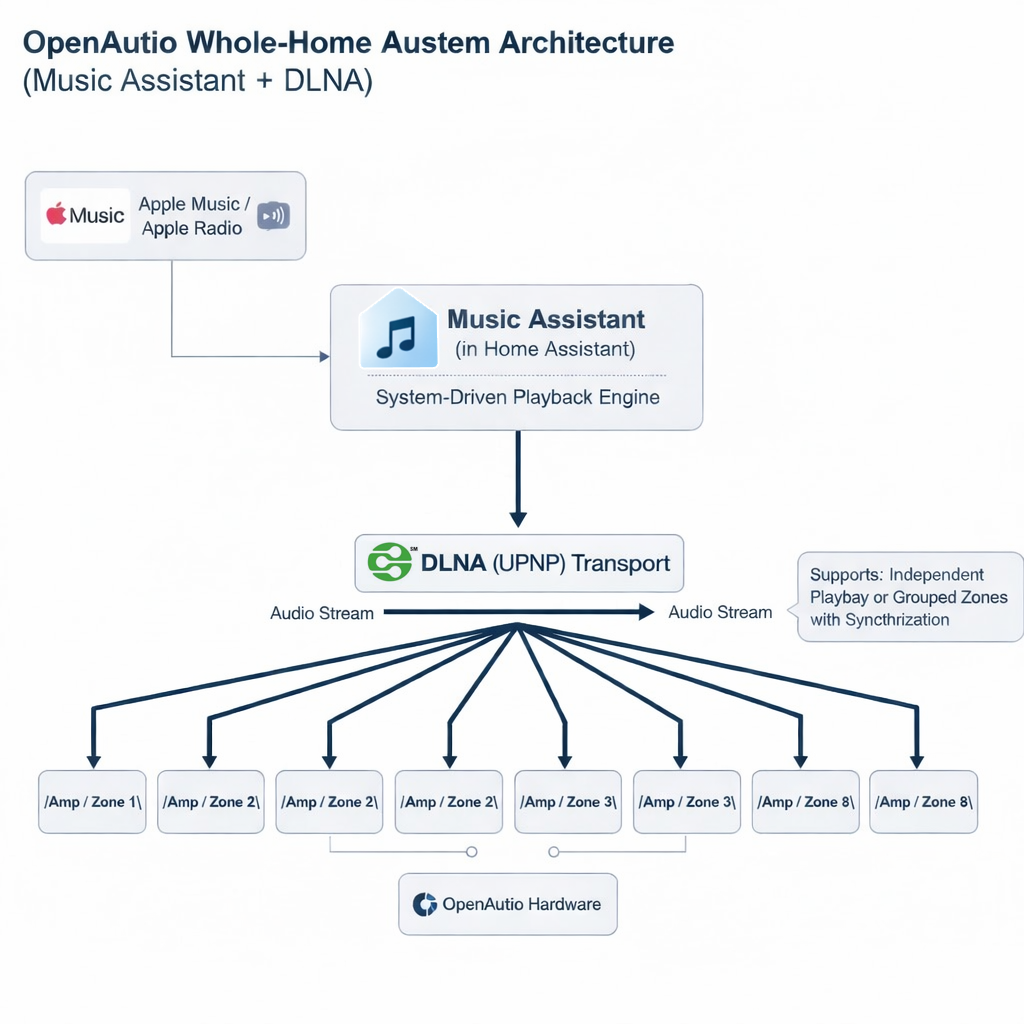
6.4 Multi-Zone Audio: Where DLNA Excels
Music Assistant’s core strength is multi-zone orchestration.
In this context, DLNA functions as an audio backplane:
- Each zone is a renderer
- The system routes streams centrally
- Synchronization and grouping are managed above the protocol layer
Unlike mobile casting, this model:
- Scales predictably
- Avoids session conflicts
- Survives network hiccups more gracefully
This is why DLNA remains common in professional and enthusiast multi-room systems.
6.5 Why App-Level DLNA Support Becomes Irrelevant
A common question is:
“Which music apps support DLNA?”
In a Music Assistant architecture, this question largely disappears.
Because:
- Music Assistant interfaces with services directly
- Playback is system-owned
- Mobile apps are removed from the audio path
As long as Music Assistant supports a given music service, DLNA compatibility at the app level no longer matters.
This decoupling is one of Music Assistant’s greatest strengths—and one of DLNA’s last remaining advantages.
6.6 Reframing DLNA Through Music Assistant
Music Assistant does not revive DLNA.
It recontextualizes it.
DLNA is no longer presented as a consumer-facing feature, but as a reliable transport layer inside a larger system.
Seen through this lens, DLNA’s role becomes clear:
DLNA is not competing with AirPlay or Google Cast. It is enabling Music Assistant to function as a true system-level audio engine.
7. A Real-World Product Example: OpenAudio & the HOLOWHAS Series
To make the discussion concrete, it is useful to look at a real hardware platform that deliberately supports DLNA alongside modern casting technologies: OpenAudio’s HOLOWHAS multi-room streaming amplifiers.
OpenAudio focuses on system-oriented whole-home audio rather than app-centric, single-room playback. The HOLOWHAS product family is designed from the outset for multi-zone, always-on, automation-friendly environments, which makes it a natural fit for platforms like Home Assistant and Music Assistant.
7.1 The HOLOWHAS Design Philosophy
Across the HOLOWHAS lineup, the core architectural principles are consistent:
- Multi-zone audio distribution (up to 8 independent zones)
- Native network-based streaming per zone
- Compatibility with system-level controllers (Home Assistant, Music Assistant)
- Support for multiple playback protocols instead of locking users into a single ecosystem
In this context, DLNA is not treated as a consumer feature, but as a reliable renderer interface used by automation systems and central controllers.
7.2 Product Line Overview
The HOLOWHAS family is segmented primarily by power capability and protocol support, not by fundamentally different software architectures.
- HOLOWHAS Ultra / Plus / Max
These models focus on increasing output power and installation scale. Ultra serves as the balanced reference model, Plus targets larger rooms and higher SPL requirements, and Max is intended for demanding installations with large speakers or higher dynamic headroom. All retain the same multi-zone streaming architecture and system-level integration capabilities. - HOLOWHAS Ultra-GC / Plus-GC
The “GC” variants extend the core platform with native Google Cast support per zone, alongside AirPlay 2, Bluetooth audio, and DLNA. This allows the same hardware to function both as a user-facing casting target (for Android and cross-platform users) and as a backend renderer for Music Assistant.
7.3 Why DLNA Matters in These Products
In HOLOWHAS systems, DLNA is primarily used in scenarios where:
- Playback is initiated by Music Assistant or Home Assistant
- Zones must remain addressable even without an active mobile session
- Long-running or automated playback is required
Meanwhile, AirPlay and Google Cast are provided for user-driven, ad-hoc playback, not as the backbone of the system.
This layered approach reflects a broader industry trend:
DLNA operates as infrastructure, while AirPlay and Cast operate as user interfaces.
7.4 Practical Implications for System Designers
By supporting DLNA, AirPlay, and Google Cast simultaneously, the HOLOWHAS series demonstrates a pragmatic design strategy:
- DLNA ensures stable integration with automation platforms
- AirPlay satisfies iOS-centric households
- Google Cast addresses Android and cross-platform use cases
Rather than competing, these protocols coexist at different layers of the system.
8. DLNA vs AirPlay vs Google Cast vs Spotify Connect
These technologies no longer compete directly.
| Technology | Primary Role Today |
| DLNA | Backend playback protocol |
| AirPlay | iOS user interaction & mirroring |
| Google Cast | Cross-platform user casting |
| Spotify Connect | Cloud-direct music control |
DLNA occupies the infrastructure layer, not the UX layer.
9. Is DLNA Still Useful? A Precise Answer
DLNA is no longer suitable for:
- Casual consumer casting
- “Play whatever is on my phone” use cases
But DLNA is still excellent for:
- Automated systems
- Multi-zone audio backbones
- Long-running, headless playback
DLNA did not fail—it was simply displaced from the front of the stage.
10. Final Conclusion
DLNA’s relevance today depends entirely on how audio systems are designed.
- In app-driven, mobile-first worlds: DLNA feels obsolete
- In system-driven, automation-first architectures: DLNA is extremely effective
Understanding this distinction allows system designers to stop debating DLNA emotionally—and start using it correctly.
DLNA is no longer a feature. It is infrastructure.



Zane
27 Jan, 2026Honestly, I still use DLNA every day for my NAS music library. It’s simple, it works, and I’m glad OpenAudio isn’t ditching the "old" reliable tech for the sake of trends.